
How to Know If a New Funeral Home Location Could Actually Work — Before You Commit
One of our funeral home partners called us recently. He had a building he liked and was looking to expand. The price was right. He was ready to sign.
We asked him one question first: "What does Google say about that market?"
He had no idea what we meant.
That's the problem. Signing a lease on gut feeling is how funeral home owners end up with a second location that never gains traction. Before you commit to a single square foot, there's one hour of free research you need to do first.
Here's exactly how to do it.
The Mistake Most Funeral Home Owners Make
Most owners pick new locations based on three things: a building they like, a price that feels right, or no obvious competitor nearby. An opportunity arises and they go for it.
There's another consideration though that can't be overlooked, and that missing piece is digital demand. Today, many families choose their funeral home based on what they find online — often within minutes of a loss. If families in that area aren't searching for funeral or cremation services on Google, your new location could still struggle no matter how nice the building is.
The good news? Google shows you the demand before you open. You just need to know where to look.
Step 1: Check Search Volume for High-Intent Keywords
Search volume tells you how many people are actively looking for funeral or cremation services in a given area each month.
"High-intent" keywords are searches people make when they need help right now— not someday, now. Things like:
"cremation services near me"
"funeral home [city name]"
"direct cremation [city name]"
"affordable funeral home [city name]"
These are families mid-crisis. They're ready to call someone.
*note there are a few dozen searches you want to be checking but these will make up the start of your research
How to check it:
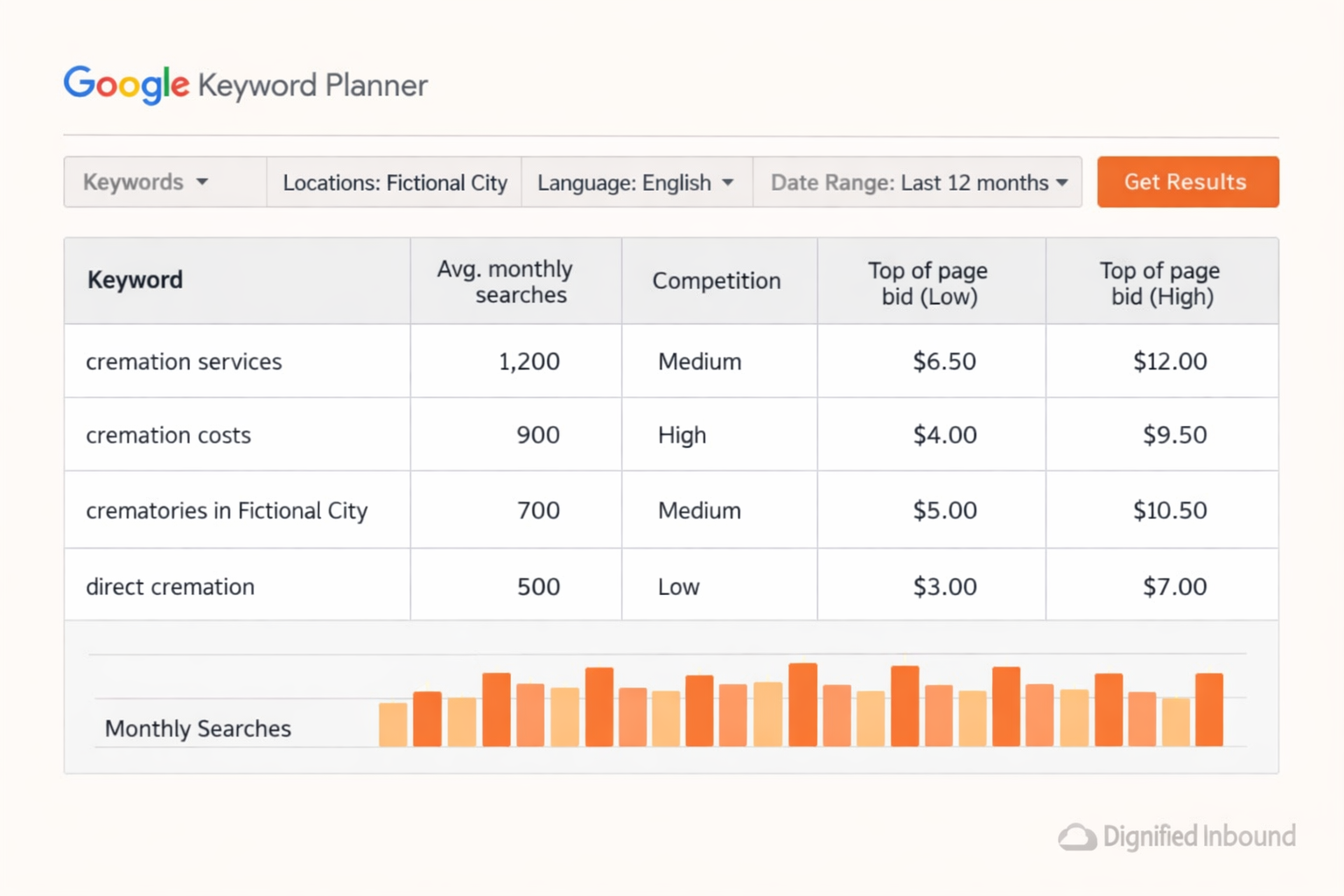
Go to Google Keyword Planner— it's free with any Google account. Type in your target keywords and set the targeting to the new location you're considering.
What the numbers mean:
3000+ monthly searches— Strong demand. Families are actively looking. Worth pursuing.
1000–2000 searches— Moderate demand. Proceed, but with realistic expectations.
Under 1000 searches— Low demand. The population may be too small, or families in that area aren't searching online yet.
"Low" or no data shown— Google doesn't have enough activity to report. For most funeral home expansions, this is a serious warning sign.
Low search volume for high-intent keywords might be a red flag. Note that thorough research needs to be conducted to get the full picture, don't rush this.
Step 2: Look at Cost Per Click
Once you've checked search volume, look at the estimated cost per click (CPC) for those same keywords.
CPC is what businesses pay each time someone clicks their Google Ad. Think of it as a competition meter. The more funeral homes bidding on a keyword, the higher the price climbs. Google Keyword Planner shows the CPC estimate right next to the search volume data.
This is a little more nuanced to read, but as a rule above $10 average click prices would be considered quite high.
High CPC doesn't mean don't open there. It means go in with eyes open and a bigger launch budget.
Step 3: Search Google Manually
This step takes 15 minutes and shows you exactly what you're up against.
Open an incognito browser window. Search "[city name] funeral home" and "[city name] cremation services." Look carefully at the results.
What to check:
The top 3 Google Map spots. These businesses get the most calls. How many reviews do they have? How recent are the reviews?
Google Ads at the top. If you see paid ads from multiple funeral homes, demand is real — and you'll be entering a competitive digital market from day one.
Competitor websites. Are they outdated? Slow? Hard to navigate on a phone? Weak websites are a genuine opportunity. If top-ranking funeral homes in that area have poor online experiences, you can move past them faster than you might think.
[IMAGE RECOMMENDATION]A side-by-side illustration showing a strong Google Maps listing vs. a weak one, highlighting review count and recency.Filename:
google-maps-funeral-home-competitor-comparison.jpgAlt text:Google Maps results showing two funeral homes — one with strong recent reviews and one with outdated information
Step 4: Check Google Trends for Long-Term Demand
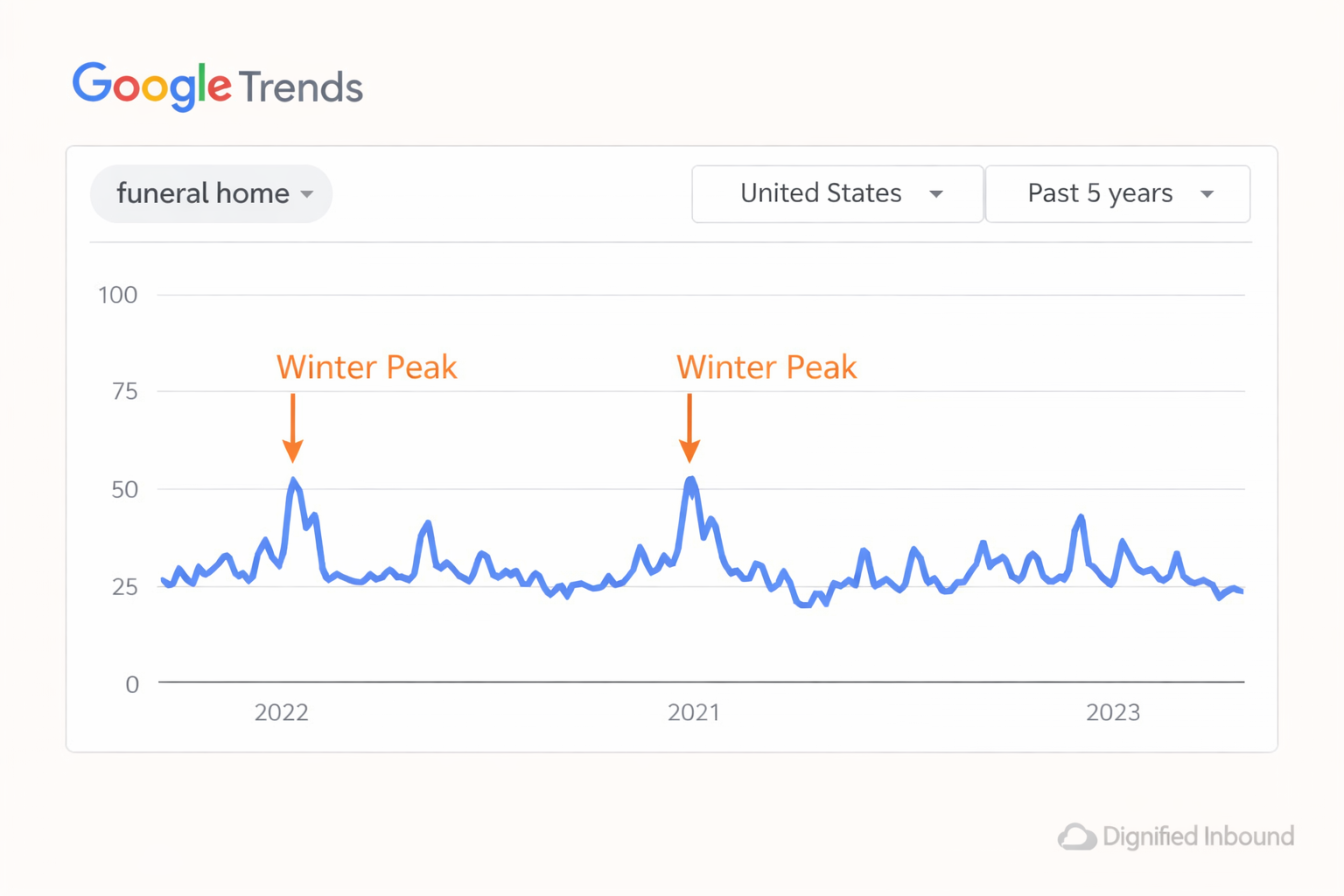
Google Trends shows how search interest changes over time. Search "cremation services" or "funeral home" alongside the state you're targeting. Look at the past two to three years.
You'll normally see higher interest in winter and a dip in summer. That's expected in the funeral industry. What you're watching for is an area where interest is consistently flat or declining over multiple years. That's worth investigating before you commit.
How to Read What You've Found
Once you've completed all four steps, you'll have a clear picture of whether the market is worth entering.
Green light: Strong search volume (3000+ per month) + moderate Google Ads click prices (under $10) + competitors with outdated websites or few recent reviews. Demand exists and there's room to compete.
Yellow light: Search volume between 1000–3000, or higher cost per click, or one competitor is already well-established. You can still win — but expect a longer runway and plan your funeral home marketing budget accordingly.
Red light: Search volume under 1000 per month, expensive CPC with multiple strong competitors already running ads, or Google shows no data at all. This doesn't automatically mean don't expand, but it means you need a very clear strategy before you sign anything.
One More Thing: You'll Start at Zero
When you open a new location, you start with zero Google Business Profile reviews. No history. No trust signals.
Traditionally building that from scratch takes 3 to 6 months to get an OK online presence established. That's not a reason to avoid expanding — but it is a reason to include your Google Business Profile strategy in your launch plan from day one, not as an afterthought six months in.
Your Pre-Lease Checklist
Before you commit to any new location, work through this list:
✅ Check monthly search volume for high-intent keywords using Google Keyword Planner
✅ Review estimated cost per click for cremation and funeral home terms in that area
✅ Search Google manually — check the top 3 map spots, review counts, review recency, and whether competitors are running paid ads
✅ Check competitor websites for quality and mobile experience
✅ Run a Google Trends check for long-term demand patterns in that state or region
✅ Factor in a 6–12 month timeline to build Google Business Profile trust from scratch
Don't skip any of these steps before signing.
The Bottom Line
Data can confirm your gut instinct if this new location is going to be viable.
If you would like help running the research on your new location, get in touch and we'll be able to run the research and provide a second opinion of the online landscape in that area.
